Flysimware Learjet 35 preset cheat sheet
Everything you need to connect your home cockpit hardware to the Flysimware Learjet 35: 19 MobiFlight presets in 4 systems. Copy a code from here, or get them all in MobiFlight with Extras › HubHop › Download Latest Presets.
- Sim:
- MSFS
- Last change:
- 20 Feb 2026
- Top contributors:
- Mark Lazarus (7) · Christian Frühauf (6) · Avionic (5)
- Profiles:
- 2 on flightsim.to
MobiFlight profiles for miniCOCKPIT
Ready-made profiles for the Flysimware Learjet 35 and the cockpit hardware they were built for, shared by the community on flightsim.to.
Hardware: miniCOCKPIT miniFCU
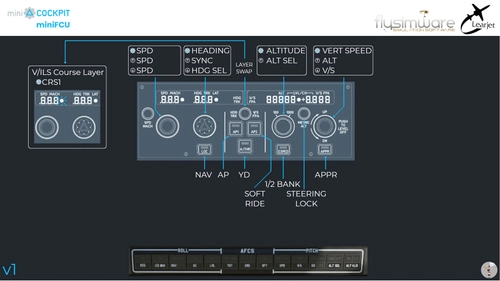
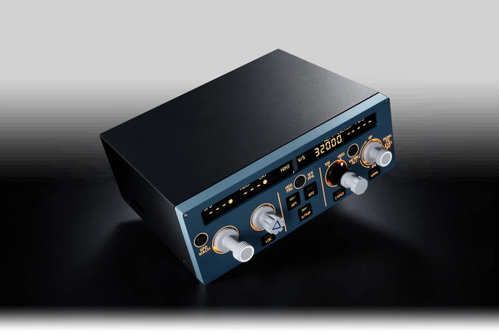
Autopilot 10 presets
Inputs — what you press (7)
- ALT SEL
(L:MODE_ALTSEL,bool) ! (>L:MODE_ALTSEL,bool)by Mark Lazarus - AP ALT ENCODER INC
(L:ALERTER_DIGITAL,Number) 1000 + 50000 min (>L:ALERTER_DIGITAL,Number)by Mark Lazarus - AP ALT VAR DEC
(L:ALERTER_DIGITAL,Number) 1000 - 0 max (>L:ALERTER_DIGITAL,Number)by Mark Lazarus - AP HDG TOGGLE
(>A:AUTOPILOT_HEADING_LOCK)by Mark Lazarus - AP IAS SPD Toggle
(>K:FLIGHT_LEVEL_CHANGE) (A:AUTOPILOT FLIGHT LEVEL CHANGE, bool) if { (A:AIRSPEED INDICATED, knots) (>K:AP_SPD_VAR_SET) }by Mark Lazarus - AP Pitch Ref down
0 (>:AP_PITCH_REF)by Christian Frühauf - AP Pitch Ref up
1 (>:AP_PITCH_REF)by Christian Frühauf
Outputs — what lights up (3)
- ALTITUDE VAR
(L:ALERTER_DIGITAL,Number)by Mark Lazarus - HDG INDC
(A:AUTOPILOT HEADING LOCK DIR,Degrees)by Mark Lazarus - NAV Light ARM Mode
(A:GPS DRIVES NAV1, Bool) 0 ==
(A:AUTOPILOT NAV1 LOCK,Bool)
(A:AUTOPILOT APPROACH HOLD,Bool) or and
-126 126 (A:HSI CDI NEEDLE,Number) rng ! and
(A:NAV HAS NAV:1,Bool) and

(A:GPS DRIVES NAV1, Bool)
(A:AUTOPILOT NAV1 LOCK,Bool)
(A:AUTOPILOT APPROACH HOLD,Bool) or and
-126 126 (A:HSI CDI NEEDLE,Number) rng ! and
(A:GPS IS ACTIVE FLIGHT PLAN,Bool) and or

(L:MODE_TST_PITCH) 0 ==
(L:AUTOPILOT_LIGHT_TEST_ON) and or
by Federico Perez Diduch
Controls 2 presets
Inputs — what you press (2)
- Steer Lock off
0 (>L:GENERIC_LEAR_STEER_LOCK_1)by Christian Frühauf - Steer Lock on
1 (>L:GENERIC_LEAR_STEER_LOCK_1)by Christian Frühauf
Outputs — what lights up (0)
None yet
Flight Instrumentation 2 presets
Inputs — what you press (2)
- Pilot Airspeed Bug Decrease
(L:GENERIC_LEAR_AIRSPEED_KNOB_L) 1 - 0 max (>L:GENERIC_LEAR_AIRSPEED_KNOB_L)by Avionic - Pilot Airspeed Bug Increase
(L:GENERIC_LEAR_AIRSPEED_KNOB_L) 1 + 400 min (>L:GENERIC_LEAR_AIRSPEED_KNOB_L)by Avionic
Outputs — what lights up (0)
None yet
Lights 5 presets
Inputs — what you press (5)
- NAV Lights off
0 (>B:GENERIC_SWITCH_NAV_LIGHT_Set)by Christian Frühauf - NAV Lights on
1 (>B:GENERIC_SWITCH_NAV_LIGHT_Set)by Christian Frühauf - Set Taxi/Landing light Left and Right LANDING
0 (>L:GENERIC_Momentary_LEAR_TAXI_LAND_L)
0 (>L:GENERIC_Momentary_LEAR_TAXI_LAND_R)
by Avionic - Set Taxi/Landing light Left and Right OFF
2 (>L:GENERIC_Momentary_LEAR_TAXI_LAND_L)
2 (>L:GENERIC_Momentary_LEAR_TAXI_LAND_R)
by Avionic - Set Taxi/Landing light Left and Right TAXI
1 (>L:GENERIC_Momentary_LEAR_TAXI_LAND_L)
1 (>L:GENERIC_Momentary_LEAR_TAXI_LAND_R)
by Avionic
Outputs — what lights up (0)
None yet
More from Flysimware
New to MobiFlight?
MobiFlight connects your switches, encoders and displays to the Flysimware Learjet 35 — every preset on this page is ready to use in it.
Download MobiFlight- Install MobiFlightand connect your board or device.
- Download the latest presetsExtras › HubHop › Download Latest Presets.
- Assign and flyPick a preset for each button, encoder or light.